Tag: Docker

  • Migrating from Docker Desktop to Colima: When Hardened Images Break

    Migrating from Docker Desktop to Colima: When Hardened Images Break

    By 10:25 AM, I’d entered what Mystery Science Theater 3000 fans call Deep Hurting.” The migra­tion plan was sol­id. The back­up dis­ci­pline was com­pre­hen­sive. The exe­cu­tion? Chaos.

    I run a con­tainer­ized pro­duc­tion Mastodon instance on an 8 GB Mac mini. (Yes, I know what the cloud peo­ple say, and FYI it’s Cloudflare Tunneled for pro­tec­tion.) My Docker Desktop installation’s half-​gig RAM foot­print was eat­ing pre­cious resources. Colima promised the same Docker expe­ri­ence with­out the GUI over­head. I bud­get­ed a 1.5 hour migra­tion plan for what should’ve been a straight­for­ward run­time swap.

    Two and a half hours and sev­en crit­i­cal issues lat­er, I’d dis­cov­ered that Docker Hardened Images and Colima don’t play nice­ly togeth­er. And that dis­cov­ery mat­ters to any­one run­ning hard­ened con­tain­ers in vir­tu­al­ized environments.


    The Plan (That Didn’t Survive Contact with Reality)

    The strat­e­gy was text­book: main­te­nance win­dow approach, com­pre­hen­sive back­ups (data­base dumps, vol­ume archives, con­fig­u­ra­tion snap­shots), explic­it roll­back pro­ce­dures. I’d stop Docker Desktop, switch the Docker con­text to Colima, update one path in the Makefile I use to auto­mate tasks, and restart ser­vices. Everything uses bind mounts, so data stays on the host file sys­tem. What could go wrong?

    Everything. Everything could go wrong.

    Obsolete Makefile references

    First back­up try:

    service "db" is not running

    Wait–what’s db? I migrat­ed from ver­sion 14 to ver­sion 17 of the PostgreSQL rela­tion­al data­base sys­tem weeks ago. Switched and even switched from the default PostgreSQL image to a Docker Hardened Image (DHI), even. My com­pose files ref­er­ence db-pg17. But the Makefile’s back­up tar­gets? Still call­ing the old db ser­vice. The PostgreSQL migra­tion doc­u­men­ta­tion lived in the README file that I keep. The Makefile lived in… a dif­fer­ent men­tal con­text apparently.

    Lesson: When you migrate infra­struc­ture com­po­nents, grep for ref­er­ences every­where. Compose files, Makefiles, scripts, doc­u­men­ta­tion. It’s work­ing” means it’s work­ing right now,” not the migra­tion completed.”

    The empty postgres17/ directory

    After resolv­ing the data­base restore issues (we’ll get there), con­tain­ers start­ed suc­cess­ful­ly. Then I ran a restart test. PostgreSQL came up empty–no data, no tables, fresh initialization.

    % ls -la postgres17/
    total 0
    drwxr-xr-x@ 2 markandsharon staff 64 Jan 7 16:31 .

    64 bytes. An emp­ty direc­to­ry. That December PostgreSQL 1417 migra­tion”? Created the direc­to­ry, nev­er pop­u­lat­ed it. PostgreSQL 14 data stayed in postgres14/. Docker Desktop must’ve been using cached or inter­nal storage.

    Lesson: Don’t trust that migra­tions suc­ceed­ed because ser­vices are healthy. Check the actu­al data files. Persistence isn’t per­sis­tence if noth­ing’s persisting.

    Wrong database target

    After fix­ing the Makefile, ser­vices start­ed… and instant­ly crash-looped:

    PG::UndefinedTable: ERROR:  relation "users" does not exist

    PostgreSQL was healthy. The appli­ca­tion dis­agreed. Turns out I’d restored the dump to the wrong database:

    # What I did (wrong):
    psql -U mastodon postgres < dump.sql
    # What I should have done:
    psql -U mastodon mastodon_production < dump.sql

    The mastodon_production data­base existed–it was just emp­ty. All my data went into the postgres data­base that noth­ing was read­ing. The psql command-​line client defaults to the data­base match­ing your user­name or postgres if unspec­i­fied. Explicit is bet­ter than implic­it, espe­cial­ly when you’re in a hurry.

    Version-​specific PGDATA paths

    Once data land­ed in the right data­base, I hit a new prob­lem: data did­n’t per­sist across restarts. The bind mount direc­to­ry stayed emp­ty even though PostgreSQL was run­ning and accept­ing writes.

    It turns out that my PostgreSQL DHI uses version-​specific paths:

    # My bind mount:
    - ./postgres17:/var/lib/postgresql/data
    # Actual DHI PostgreSQL data directory:
    # PGDATA=/var/lib/postgresql/17/data

    The mount shad­owed the wrong direc­to­ry. PostgreSQL wrote data to /var/lib/postgresql/17/data, which was­n’t mount­ed. Data lived in ephemer­al con­tain­er stor­age. Restart? Data gone.

    $ docker compose exec db-pg17 psql -U mastodon postgres -c "SHOW data_directory;"
           data_directory
    -----------------------------
     /var/lib/postgresql/17/data

    Lesson: Verify assump­tions. Every sin­gle one. Check SHOW data_directory; imme­di­ate­ly after con­tain­er start. Test a restart before cel­e­brat­ing success.

    I cor­rect­ed the mount path to match DHI’s expect­ed loca­tion. That’s when I found the real problem.

    The DHI + Colima Incompatibility Discovery: VirtioFS bind mount ownership failures

    After cor­rect­ing the mount path, PostgreSQL entered an imme­di­ate crash-loop:

    FATAL: data directory "/var/lib/postgresql/17/data" has wrong ownership
    HINT: The server must be started by the user that owns the data directory.

    Inside the con­tain­er, the mount­ed direc­to­ry appeared owned by the root user (user ID 0). But PostgreSQL runs as the postgres user. Permission denied.

    % docker compose run --rm --entrypoint sh db-pg17 -c "ls -ld /var/lib/postgresql/17/data"
    drwxr-xr-x 2 0 0 4096 Jan 10 16:22 /var/lib/postgresql/17/data
    # Owner: UID 0 (root), but PostgreSQL requires postgres user ownership

    Colima uses the VirtioFS sys­tem for file shar­ing. VirtioFS han­dles UID map­ping dif­fer­ent­ly than Docker Desktop’s vir­tu­al machine (VM) imple­men­ta­tion. Bind mounts that work per­fect­ly on Docker Desktop fail on Colima because the own­er­ship map­ping does­n’t translate.

    Fine. This is a known issue with Colima and some images. I’ll switch to a named volume–Docker man­ages those inter­nal­ly, so host filesys­tem per­mis­sions should­n’t matter.

    Named vol­umes still failed:

    FATAL: data directory "/var/lib/postgresql/17/data" has wrong ownership

    Wait. Named vol­umes are sup­posed to be iso­lat­ed from host file sys­tem issues. They’re man­aged entire­ly by Docker. Fresh named vol­ume, Docker cre­ates it, Docker pop­u­lates it–and it still shows wrong own­er­ship inside the DHI container.

    # Fresh named volume:
    % docker compose run --rm --entrypoint sh db-pg17 -c "ls -ld /var/lib/postgresql/17/data"
    drwxr-xr-x 2 0 0 4096 Jan 10 16:22 /var/lib/postgresql/17/data

    DHI PostgreSQL’s entry­point has envi­ron­men­tal assump­tions that Colima’s VM does­n’t sat­is­fy. The image’s secu­ri­ty hard­en­ing includes stricter own­er­ship val­i­da­tion. That val­i­da­tion does­n’t account for Colima’s vol­ume handling.

    The pragmatic trade-off

    So I had to make a decision:

    1. Debug DHI + Colima com­pat­i­bil­i­ty (unknown time invest­ment, might be unsolv­able), or
    2. Switch to the stan­dard postgres:17-alpine image (known work­ing, imme­di­ate resolution)

    Production sys­tem. Already 1.5 hours into debug­ging. Swap the image:

    # Before (DHI):
    image: dhi.io/postgres:17-alpine3.22
    volumes:
      - postgres17-data:/var/lib/postgresql/17/data
    # After (Standard):
    image: postgres:17-alpine
    volumes:
      - postgres17-data:/var/lib/postgresql/data

    PostgreSQL ini­tial­ized suc­cess­ful­ly. Data per­sist­ed across restarts. Services came up healthy.

    The trade-​off:

    • Gained: Colima com­pat­i­bil­i­ty, reli­able data per­sis­tence, onward progress
    • Lost (tem­porar­i­ly): DHI secu­ri­ty hardening–documented for future investigation

    Docker Hardened Images offer secu­ri­ty fea­tures through stricter defaults and entry­point val­i­da­tion. Those same strict require­ments reduce the com­pat­i­bil­i­ty sur­face. When you intro­duce a dif­fer­ent vir­tu­al­iza­tion envi­ron­ment (Colima’s VirtioFS instead of Docker Desktop’s VM), the hard­en­ing becomes brittleness.

    This isn’t DHI’s fault–it’s the expect­ed con­se­quence of defense-​in-​depth. But if you’re migrat­ing from Docker Desktop to Colima, test your image com­pat­i­bil­i­ty in iso­la­tion first. This is cru­cial if you are using Docker Hardened Images. Carry out these tests before migra­tion day.


    The Outcome

    Migration com­plet­ed at 11:30 AM. Zero data loss. All ser­vices healthy. Automation restored. RAM reclaimed (Docker Desktop’s over­head vs. Colima’s neg­li­gi­ble footprint).

    The real out­come was discovering–systematically, through elimination–that DHI PostgreSQL and Colima are incom­pat­i­ble with­out fur­ther inves­ti­ga­tion. I’ve doc­u­ment­ed this as a known issue. Future work: test DHI with dif­fer­ent vol­ume strate­gies, check whether new­er DHI ver­sions resolve the issue, eval­u­ate whether the secu­ri­ty delta mat­ters for a single-​user instance.

    For now, I’m run­ning stan­dard postgres:17-alpine. The migra­tion is suc­cess­ful. The secu­ri­ty regres­sion is doc­u­ment­ed and sched­uled for future inves­ti­ga­tion. Forward progress beats perfectionism.

    Key Takeaways

    Backups are your safe­ty net–use them. I restored the data­base once dur­ing this migra­tion. That restore took 30 sec­onds because I’d ver­i­fied the back­up exist­ed and was recent.

    Systematic debug­ging beats pan­ic every time. Bind mounts failed → tried named vol­umes → still failed → iso­lat­ed to image-​specific behav­ior. That pro­gres­sion ruled out host file sys­tem issues and point­ed direct­ly at image compatibility.

    Pragmatic trade-​offs beat per­fec­tion­ism. I could’ve spent hours debug­ging DHI com­pat­i­bil­i­ty. Instead, I doc­u­ment­ed the incom­pat­i­bil­i­ty, switched to stan­dard images, and moved on. The secu­ri­ty regres­sion is tracked. The pro­duc­tion sys­tem is running.

    Document fail­ures hon­est­ly; they’re learn­ing oppor­tu­ni­ties. This post exists because the migra­tion did­n’t go smooth­ly. The DHI + Colima incom­pat­i­bil­i­ty is now doc­u­ment­ed for any­one else hit­ting the same issue. That’s more valu­able than a here’s how I moved from X to Y” suc­cess story.

    Migration dura­tion2.5 hours actu­al vs. 1.5 hours planned
    Issues encoun­tered7 crit­i­cal
    Data loss0 bytes
    ServicesAll healthy
    Memory reclaimed~500 MB
    Novel dis­cov­er­ies1 (DHI + Colima incompatibility)
    Trade-​offs documented1 (secu­ri­ty hard­en­ing vs. compatibility

    Running pro­duc­tion infra­struc­ture on an 8 GB Mac mini teach­es you to val­ue both resources and reli­a­bil­i­ty. Colima deliv­ers on the resources. This migra­tion deliv­ered on the reli­a­bil­i­ty… eventually.

  • 10 Lines to Better Docker Compose Secrets

    10 Lines to Better Docker Compose Secrets

    This is a prac­ti­cal pat­tern I use when con­tainer­ized apps expect envi­ron­ment vari­ables but I want the secu­ri­ty ben­e­fits of file-​mounted secrets. Drop the shell script below next to your Docker Compose files and you can do the same.

    Quick overview

    Secrets like pass­words and API keys belong out­side your repos­i­to­ry and appli­ca­tion image lay­ers. Docker Compose can mount such secrets in your con­tain­ers as files under /run/secrets, which keeps them out of images and ver­sion con­trol. But many apps still expect con­fig­u­ra­tion via envi­ron­ment vari­ables. Rather than chang­ing app code, I use a tiny wrap­per script that:

    • reads every file in /run/secrets
    • exports each file’s con­tents as an envi­ron­ment variable
    • then execs the orig­i­nal command

    It’s small, pre­dictable, portable, and keeps secrets from mix­ing with your ver­sioned .env envi­ron­ment files and out of your Compose files.

    How it works

    • Location: Docker Compose mounts secrets into the con­tain­er at /run/secrets/<NAME>.
    • Mapping rule: The wrap­per uses those file names as envi­ron­ment vari­able names; the file con­tents become the val­ues. Secret names in your Compose file must be valid shell iden­ti­fiers (they become both the file names in /run/secrets and the export­ed vari­able names).
    • Execution: After export­ing vari­ables, the script uses exec "$@" so that the wrapped process replaces the shell and inher­its the export­ed environment.
    • Security mod­el: Secrets remain files you can per­mis­sion appro­pri­ate­ly on the host; they’re not baked into images or stored in your Compose YAML as plain text.

    The script

    Let’s call it with-secrets.sh:

    #!/bin/sh
    set -eu
    
    for secret_file in /run/secrets/*; do
      [ -e "$secret_file" ] || continue
      if [ -f "$secret_file" ]; then
        name=$(basename "$secret_file")
        export "$name=$(cat "$secret_file")"
      fi
    done
    
    exec "$@"

    Notes about the script

    • set -eu fails fast on unset vari­ables or errors.
    • Since it exports each secret using the file name as the vari­able name, san­i­tize the file name if you need dif­fer­ent envi­ron­ment vari­able names.
    • The final exec hands con­trol to your app with­out leav­ing an extra shell process.

    Example Compose snippet

    services:
      app:
        image: your-app:latest
        secrets:
          - DB_PASS
          - API_KEY
        volumes:
          - ./with-secrets.sh:/with-secrets.sh:ro
        command: ["/with-secrets.sh", "your-original-command", "--with-args"]
    
    secrets:
      DB_PASS:
        file: ./secrets/db_password.txt
      API_KEY:
        file: ./secrets/api_key.txt

    Behavior: DB_PASS and API_KEY above appear as files (/run/secrets/DB_PASS, /run/secrets/API_KEY); the mount­ed with-secrets.sh wrap­per script exports them as DB_PASS and API_KEY envi­ron­ment vari­ables for your-original-command --with-args.

    Decision points and alternatives

    • Prefer native *_FILE sup­port if your app sup­ports it (e.g., PostgreSQL’s PGPASSFILE). That avoids the wrap­per entirely.
    • For multi-​host or high-​compliance deploy­ments, use an exter­nal secrets man­ag­er (e.g., Hashicorp Vault, cloud KMS, SOPS) rather than Compose secrets.
    • Build-​time secrets are a sep­a­rate con­cern; use BuildKit or ded­i­cat­ed build secret mech­a­nisms to avoid leak­ing cre­den­tials into your image layers.

    Risks and mitigations

    • Risk: Accidentally log­ging or dump­ing envi­ron­ment vari­ables
      Mitigation: Never print envi­ron­ment vari­ables in logs and restrict debug output
    • Risk: Secret file names that are not valid shell iden­ti­fiers
      Mitigation: Normalize or map file names to safe envi­ron­ment vari­able names before exporting
    • Risk: Secrets checked into git or oth­er ver­sion con­trol
      Mitigation: Keep secret files out of repos, add strict .gitignore rules, and inject secrets via CI/​CD or run­time provisioning

    Final notes

    This pat­tern is inten­tion­al­ly prag­mat­ic: it pre­serves the secu­ri­ty advan­tage of file-​mounted secrets while let­ting unmod­i­fied apps keep using envi­ron­ment vari­ables. It’s not a sil­ver bul­let for every environment–use it where Compose secrets are appro­pri­ate and pair it with stronger secret stores for production-​grade, multi-​host deployments.

  • Treating My Résumé Like Infrastructure

    Treating My Résumé Like Infrastructure

    Applying Platform Thinking to the Job Hunt

    Most job appli­ca­tions today are screened by AI-​driven appli­cant track­ing sys­tems (ATS) before a human ever sees them. That means for­mat­ting con­sis­ten­cy, key­word align­ment, and clar­i­ty aren’t just nice to have — they’re sur­vival traits. Manually tai­lor­ing each ver­sion is slow and error-prone.

    I’ve been build­ing pro­duc­tion sys­tems for thir­ty years, from back­end ser­vices to release automa­tion. When I saw myself main­tain­ing mul­ti­ple Word doc­u­ments for dif­fer­ent job con­texts, I did what any soft­ware engi­neer would do: I built a sys­tem instead.

    The problem and solution

    Job hunt­ing requires mul­ti­ple résumé ver­sions for dif­fer­ent roles like plat­form vs back­end. It also demands mul­ti­ple for­mats like PDF, HTML, and plain text for ATS fil­ters. Additionally, you need to man­age the con­tent selec­tive­ly by hid­ing old projects, lim­it­ing bul­lets, and empha­siz­ing dif­fer­ent skills. Manually main­tain­ing these vari­a­tions leads to copy-​paste errors, out­dat­ed infor­ma­tion, and hours spent reformatting.

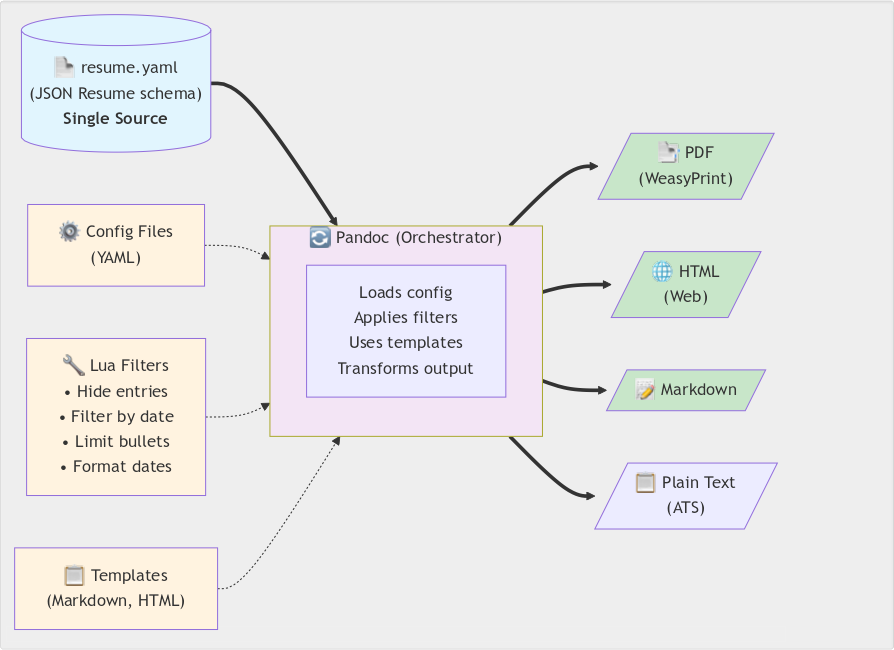
    Instead of man­ag­ing vari­ants man­u­al­ly, I treat my résumé as data flow­ing through a con­fig­urable trans­for­ma­tion pipeline. One YAML file adher­ing to the JSON Resume schema serves as the source of truth. Pandoc with cus­tom Lua fil­ters trans­forms it based on YAML con­fig files.

    The fil­ters hide entries marked x-hidden: true, fil­ter by date ranges, lim­it bul­let points, and for­mat dates con­sis­tent­ly. They also adjust sec­tion titles auto­mat­i­cal­ly. The sys­tem out­puts PDF (via WeasyPrint), HTML, Markdown, or plain text. Git branch­es track ver­sions per company/​role.

    The archi­tec­ture sep­a­rates con­tent (YAML), pre­sen­ta­tion (tem­plates), and trans­for­ma­tion log­ic (Lua fil­ters). Configuration over dupli­ca­tion. Infrastructure as code.

    A single-source document generation system that transforms one YAML résumé file (following JSON Resume schema) into multiple output formats through Pandoc orchestration. The pipeline leverages configurable Lua filters for content customization (hiding entries, date filtering, bullet limiting), YAML configuration files for settings, and flexible templates to generate PDF (via WeasyPrint), HTML, Markdown, and ATS-compliant plain text versions. This approach ensures consistency across all formats while allowing format-specific optimizations and customizations.
    The résumé ren­der­ing pipeline

    Example: Platform engineering résumé

    Here’s how that think­ing plays out in prac­tice. For a plat­form engi­neer­ing role, I want to:

    1. Hide CPAN projects old­er than 10 years (too Perl-focused)
    2. Limit work high­lights to 3 per job (keep it concise)
    3. Emphasize con­tainer­iza­tion and automa­tion experience

    Example commands

    # Adjust configuration
    vim share/pandoc/metadata/date_past.yaml        # Set project age limit
    vim share/pandoc/metadata/highlights_limit.yaml # Set bullet limits
    
    # Generate
    ./scripts/save_pdf.sh eg/mjgardner_resume.yaml
    
    # Or with Docker
    docker compose run --rm resume-remixer \
      ./scripts/save_pdf.sh eg/mjgardner_resume.yaml

    The pipeline automatically:

    • Filters out old projects
    • Trims bul­let points to the first 3 per job
    • Updates sec­tion titles (“Projects” → Selected Recent Projects”)
    • Generates clean, pro­fes­sion­al PDF output

    No man­u­al edit­ing. No copy-​paste. Reproducible every time.

    Infrastructure thinking in practice

    Platform engi­neer­ing isn’t just spe­cif­ic tools — it’s an approach. When you see a repet­i­tive man­u­al process, you auto­mate. When data needs mul­ti­ple rep­re­sen­ta­tions, you build trans­for­ma­tion pipelines. When repro­ducibil­i­ty mat­ters, you containerize.

    This résumé gen­er­a­tor uses the same prin­ci­ples I apply to release pipelines and build automa­tion. One source of truth, con­fig­urable trans­for­ma­tions, repro­ducible out­put. The tools here are Pandoc, Lua, and Docker, but the approach works regard­less of stack.

    Using JSON Resume schema makes the data portable. Dockerizing the pipeline ensures repro­ducibil­i­ty across plat­forms. Version con­trol enables branch­ing per appli­ca­tion. The right abstrac­tions (YAML con­fig files instead of code) make it usable.

    The code

    Full source, doc­u­men­ta­tion, and exam­ples: codeberg.org/mjgardner/resume-remixer

    Licensed open source. If you’re main­tain­ing mul­ti­ple résumé ver­sions man­u­al­ly, give it a try. Let me know how you adapt it for your own workflow.

  • My mini Mastodon server

    My mini Mastodon server

    Social media is how many peo­ple expe­ri­ence the Internet today. There’s a good chance you found this post through one of them. But the way we con­nect online does­n’t have to be dic­tat­ed by a hand­ful of plat­forms. Beyond the single-​app, single-​site giants, there’s the Fediverse: a con­stel­la­tion of inde­pen­dent social net­works that talk to each other.

    Think of it like email: no sin­gle com­pa­ny in charge, no cen­tral ser­vice to rule them all. It’s pow­ered by a mix of soft­ware for text, pho­tos, pod­casts, events, and more.

    Mastodon is one of the most pop­u­lar of these–a microblog­ging” plat­form like X (née Twitter), but open-​source and fed­er­at­ed. You can join one of thou­sands of servers run by oth­ers… or, if you’re me, you host your own on a tiny Mac mini sit­ting on top of a file cabinet.

    But why?

    I’d been hap­pi­ly toot­ing away on a cou­ple of well-​run Mastodon servers for years. But I kept run­ning into lit­tle things I want­ed to tweak: themes, mod­er­a­tion set­tings, even the domain of my han­dle. None of them were deal-​breakers, but they added up. Eventually, I real­ized that the only way to get exact­ly what I want­ed was to set it up myself.

    The hardware

    When I say tiny, I mean tiny: a low-​spec 2023 M2 Mac mini, 8 GB mem­o­ry, 512 GB solid-​state dri­ve. My wife and I had set it up in our home office to dri­ve a TV dis­play­ing our shared sched­ule. I had also installed a Calibre serv­er for our e‑book library.

    So the mini isn’t even close to break­ing a sweat yet. And I was encour­aged to read that oth­ers were suc­cess­ful­ly run­ning single-​user Mastodon servers on a Raspberry Pi.

    The mini was more than capa­ble. The next step was fig­ur­ing out how to run Mastodon with­out becom­ing a main­te­nance headache.

    The containers

    Mastodon’s offi­cial instal­la­tion instruc­tions involve set­ting up a vari­ety of ser­vices on a Linux VPS (vir­tu­al pri­vate serv­er). But there’s an eas­i­er, lit­er­al­ly more self-​contained way: Docker con­tain­ers, orches­trat­ed through Docker Compose and run­ning via Docker Desktop.

    Mastodon’s source code repos­i­to­ry even includes a starter docker-​compose file describing:

    • a PostgreSQL database
    • a Redis cache
    • the Mastodon web application
    • its ancil­lary stream­ing ser­vice and Sidekiq back­ground event queue

    Everything is con­tainer­ized. Still, there must be a way to keep the host safe from the open Internet.

    Avoiding overexposure

    Directly expos­ing the Mac mini to the full mal­ice of the Internet filled me with dread. And besides, my home con­nec­tion lacks a guar­an­teed fixed address to which I’d attach a domain name. My solu­tion? Cloudflare Tunnel, a ser­vice run by my domain reg­is­trar and name service.

    All I need to do is add anoth­er Docker con­tain­er ser­vice. Cloudflare man­ages the web traf­fic to and from Mastodon. The oth­er ser­vices and the host Mac then stay safe from harm.

    With the tun­nel in place, I can focus on keep­ing the set­up lean and easy to update.

    Aiming for maintainability

    Despite all of these mov­ing parts, I still aim to keep the Mac phi­los­o­phy of sim­plic­i­ty. To change only what I need, I use git to clone Mastodon’s GitHub repos­i­to­ry. Then, I check out the lat­est release tag. Finally, I’ve got this docker-compose.override.yml file with just my mod­i­fi­ca­tions for the var­i­ous con­tain­er services:

    docker-compose.override.yml
    x-mastodon-local: &mastodon-local
      secrets:
        - postgres_password
        - smtp_password
        - redis_password
        - secret_key_base
        - vapid_private
        - ar_enc_primary
        - ar_enc_deterministic
        - ar_enc_salt
      volumes:
        - ./local/scripts/with-secrets.sh:/with-secrets.sh:ro
    
    services:
      # not in upstream
      cloudflared:
        image: cloudflare/cloudflared:latest
        restart: unless-stopped
        secrets:
          - cloudflared_tunnel_token
        environment:
          TUNNEL_TOKEN_FILE: /run/secrets/cloudflared_tunnel_token
        command: tunnel --no-autoupdate run
        depends_on:
          - web
        networks:
          - external_network
    
      # overriding upstream
      db:
        restart: unless-stopped
        secrets:
          - postgres_password
        environment:
          POSTGRES_PASSWORD_FILE: /run/secrets/postgres_password
        env_file: .env.db.local
        healthcheck:
          test:
            - CMD-SHELL
            - >
              pg_isready --dbname=$$POSTGRES_DB --username=$$POSTGRES_USER
              && psql -U $$POSTGRES_USER -d $$POSTGRES_DB -c 'SELECT 1' >/dev/null
          interval: 30s
          timeout: 5s
          retries: 5
    
      # overriding upstream
      redis:
        restart: unless-stopped
    
      # overriding upstream
      web:
        <<: *mastodon-local
        command: ["/with-secrets.sh", "bundle", "exec", "puma", "-C", "config/puma.rb"]
        restart: unless-stopped
        ports: [] # doesn't actually override, just merges :-(
        expose:
          - 3000
        depends_on:
          db:
            condition: service_healthy
          redis:
            condition: service_healthy
          es:
            condition: service_healthy
    
      # overriding upstream
      streaming:
        <<: *mastodon-local
        command: ["/with-secrets.sh", "node", "./streaming/index.js"]
        restart: unless-stopped
        networks:
          - internal_network
        ports: [] # doesn't actually override, just merges :-(
        depends_on:
          db:
            condition: service_healthy
          redis:
            condition: service_healthy
    
      # overriding upstream
      sidekiq:
        <<: *mastodon-local
        command: /with-secrets.sh bundle exec sidekiq \
          -q default \
          -q ingress \
          -q mailers \
          -q pull \
          -q push \
          -q scheduler \
          -q search \
          -q indexing_scheduler
        restart: unless-stopped
        healthcheck:
          test: ["CMD", "pgrep", "-f", "sidekiq"]
          interval: 30s
          timeout: 10s
          retries: 3
        depends_on:
          db:
            condition: service_healthy
          redis:
            condition: service_healthy
        networks:
          - internal_network
          - external_network
    
      # commented out upstream
      es:
        image: docker.elastic.co/elasticsearch/elasticsearch:7.17.4
        restart: unless-stopped
        env_file: .env.es.local
        networks:
          - internal_network
        healthcheck:
          test:
            - CMD-SHELL
            - curl --silent --fail localhost:9200/_cluster/health || exit 1
        volumes:
          - ./elasticsearch:/usr/share/elasticsearch/data
        ulimits:
          memlock:
            soft: -1
            hard: -1
          nofile:
            soft: 65536
            hard: 65536
    
    secrets:
      cloudflared_tunnel_token:
        file: ./local/secrets/cloudflared_tunnel_token.txt
      postgres_password:
        file: ./local/secrets/postgres_password.txt
      smtp_password:
        file: ./local/secrets/smtp_password.txt
      redis_password:
        file: ./local/secrets/redis_password.txt
      secret_key_base:
        file: ./local/secrets/mastodon/secret_key_base.txt
      vapid_private:
        file: ./local/secrets/mastodon/vapid_private.txt
      ar_enc_primary:
        file: ./local/secrets/mastodon/activerecord/encryption_primary.txt
      ar_enc_deterministic:
        file: ./local/secrets/mastodon/activerecord/encryption_deterministic.txt
      ar_enc_salt:
        file: ./local/secrets/mastodon/activerecord/encryption_salt.txt

    Full code list­ings are expand­able on the web­site; email read­ers may need to click through to view them.

    Let’s start from the bot­tom secrets section.

    Secrets management

    Rather than Mastodon’s typ­i­cal approach of expos­ing pass­words, tokens, and oth­er sen­si­tive infor­ma­tion as envi­ron­ment vari­ables, I use a more secure approach. I mount each one as a sep­a­rate text file. Then rel­e­vant ser­vices can read these files direct­ly or pass them as vari­ables on startup.

    To make sure I don’t acci­den­tal­ly com­mit pri­vate infor­ma­tion to git, /local/secrets/ is in my repos­i­to­ry’s .git/info/exclude file.

    Shared configuration with a YAML extension

    Back to the top, and I have a x-mastodon-local YAML exten­sion for shared con­fig­u­ra­tion among sev­er­al of Mastodon’s services:

    x-mastodon-local: &mastodon-local
      secrets:
        - postgres_password
        - smtp_password
        - redis_password
        - secret_key_base
        - vapid_private
        - ar_enc_primary
        - ar_enc_deterministic
        - ar_enc_salt
      volumes:
        - ./local/scripts/with-secrets.sh:/with-secrets.sh:ro

    This lists most of the afore­men­tioned secrets, and mounts a wrap­per script to set them as envi­ron­ment variables.

    The wrapper script

    Speaking of which:

    with-secrets.sh
    #!/bin/sh
    
    set -eu
    
    # Map of secret file name to environment variable name
    for secret in \
      "postgres_password:DB_PASS" \
      "smtp_password:SMTP_PASSWORD" \
      "redis_password:REDIS_PASSWORD" \
      "secret_key_base:SECRET_KEY_BASE" \
      "vapid_private:VAPID_PRIVATE_KEY" \
      "ar_enc_primary:ACTIVE_RECORD_ENCRYPTION_PRIMARY_KEY" \
      "ar_enc_deterministic:ACTIVE_RECORD_ENCRYPTION_DETERMINISTIC_KEY" \
      "ar_enc_salt:ACTIVE_RECORD_ENCRYPTION_KEY_DERIVATION_SALT"
    do
      # Split the pair into file name and env var name
      # ${var%%:*} -- strip everything from the first ":" onward
      # (keeps left side)
      name="${secret%%:*}"
      # ${var##*:} -- strip everything up to and including the last ":"
      # (keeps right side)
      var="${secret##*:}"
    
      file="/run/secrets/$name"
    
      # If the secret file exists, read its contents into the env var
      if [ -f "$file" ]
      then
        eval "export $var=\"$(cat "$file")\""
      fi
    done
    
    # Hand off to the original command
    exec "$@"

    Full code list­ings are expand­able on the web­site; email read­ers may need to click through to view them.

    Since Mastodon wants every­thing, secrets includ­ed, as envi­ron­ment vari­ables, this script:

    • loops through a map of their cor­re­spond­ing secrets files
    • exports each of their con­tents to the environment
    • and then runs what­ev­er com­mand was passed along for the ride.

    Customized containerized services

    Remember that docker-compose.override.yml gets merged with the upstream docker-compose.yml file, so I only need to write nec­es­sary changes and addi­tions. Let’s take them one at a time.

    Cloudflare Tunnel

      cloudflared:
        image: cloudflare/cloudflared:latest
        restart: unless-stopped
        secrets:
          - cloudflared_tunnel_token
        environment:
          TUNNEL_TOKEN_FILE: /run/secrets/cloudflared_tunnel_token
        command: tunnel --no-autoupdate run
        depends_on:
          - web
        networks:
          - external_network

    This ser­vice is com­plete­ly new, with noth­ing to over­ride. I spec­i­fy every­thing from the Docker Hub-​based image to the start­up com­mand. I also spec­i­fy the exter­nal net­work used to talk to Cloudflare’s servers.

    Of spe­cial note is the TUNNEL_TOKEN_FILE envi­ron­ment vari­able. This fea­ture was added a mere six months ago. It enables load­ing the Cloudflare-​provided authen­ti­ca­tion token direct­ly from my mount­ed file in /run/secrets. This avoids stuff­ing its con­tents into an envi­ron­ment vari­able itself. I also add a depends_on item for the Mastodon web ser­vice. This ensures that Mastodon is run­ning before I open the tunnel.

    PostgreSQL database

      db:
        restart: unless-stopped
        secrets:
          - postgres_password
        environment:
          POSTGRES_PASSWORD_FILE: /run/secrets/postgres_password
        env_file: .env.db.local
        healthcheck:
          test:
            - CMD-SHELL
            - >
              pg_isready --dbname=$$POSTGRES_DB --username=$$POSTGRES_USER
              && psql -U $$POSTGRES_USER -d $$POSTGRES_DB -c 'SELECT 1' >/dev/null
          interval: 30s
          timeout: 5s
          retries: 5

    This over­rides sev­er­al set­tings in the upstream docker-compose.yml file, most sig­nif­i­cant­ly in the secrets depart­ment, which fol­lows the same pat­tern as the above cloudflared service.

    And since the upstream git repos­i­to­ry ignores files match­ing .env*.local, I set POSTGRES_DB and POSTGRES_USER envi­ron­ment vari­ables in an .env.db.local file and hard­en the healthcheck.test to both check that PostgreSQL is accept­ing con­nec­tions and that a sim­ple query is suc­cess­ful. That check is run every thir­ty sec­onds and retried up to five times if unsuc­cess­ful. It times out after a mere five sec­onds, more than enough time because every­thing’s run­ning on the same host.

    A brief stop with Redis

      redis:
        restart: unless-stopped

    The only change to upstream’s Redis con­fig­u­ra­tion is restart­ing the ser­vice if it was­n’t man­u­al­ly stopped. (Every oth­er ser­vice in my over­ride file also uses this.) Then I can bring any of them down for main­te­nance or trou­bleshoot­ing, and not wor­ry about docker compose over-​enthusiastically start­ing them up again.

    The Mastodon services

    The Mastodon con­tain­er image itself runs two dif­fer­ent ser­vices, with a third ser­vice next door:

    • web: UI and API
    • sidekiq: back­ground jobs like fed­er­a­tion and media processing
    • streaming: real-​time updates–timelines, notifications–so they arrive instant­ly with­out page reloads
    docker-compose.override.yml (Mastodon ser­vices excerpt)
      web:
        <<: *mastodon-local
        command: ["/with-secrets.sh", "bundle", "exec", "puma", "-C", "config/puma.rb"]
        restart: unless-stopped
        expose:
          - 3000
        depends_on:
          db:
            condition: service_healthy
          redis:
            condition: service_healthy
    
      streaming:
        <<: *mastodon-local
        command: ["/with-secrets.sh", "node", "./streaming/index.js"]
        restart: unless-stopped
        networks:
          - internal_network
        depends_on:
          db:
            condition: service_healthy
          redis:
            condition: service_healthy
    
      sidekiq:
        <<: *mastodon-local
        command: /with-secrets.sh bundle exec sidekiq
        restart: unless-stopped
        healthcheck:
          test: ["CMD", "pgrep", "-f", "sidekiq"]
          interval: 30s
          timeout: 10s
          retries: 3
        depends_on:
          db:
            condition: service_healthy
          redis:
            condition: service_healthy
        networks:
          - internal_network
          - external_network

    Full code list­ings are expand­able on the web­site; email read­ers may need to click through to view them.

    Each of these ser­vices brings in the mastodon-local YAML exten­sion defined ear­li­er. This approach avoids repeat­ing the same secrets and volumes each time. They also repeat upstream’s command entries, but wrapped in the with-secrets.sh script described above.

    Each ser­vice also has a depends_on stan­za that relies on the PostgreSQL and Redis ser­vice report­ing good health. The rest is just net­work­ing tweaks. lim­it­ing exter­nal expo­sure to the web ser­vice only.

    Again, the point here is main­tain­abil­i­ty and only over­rid­ing what’s not already cov­ered by upstream’s docker-compose.yml file. 

    Bringing it all together

    The con­tain­ers are hum­ming along. Secrets are tucked safe­ly away. Cloudflare qui­et­ly han­dles the out­side world. My lit­tle Mac mini now runs a fully-​fledged Mastodon instance, still with­out break­ing a sweat. It’s not just a proof-of-concept–it’s my dai­ly dri­ver for post­ing, fol­low­ing, and explor­ing the Fediverse.

    Performance has been pleas­ant­ly unevent­ful: CPU and mem­o­ry usage stay low, even dur­ing busy fed­er­at­ed time­lines. The tun­nel has been rock-​solid, and the override-​only approach means I can pull upstream updates with­out dread­ing a merge marathon.

    Lessons learned

    • Secrets-​as-​files keep sen­si­tive data out of the envi­ron­ment and out of ver­sion control–worth the extra setup.
    • Docker over­ride files are a sanity-​saver; upstream changes flow in with­out tram­pling my tweaks.
    • Health checks aren’t just for show–they’ve already caught a mis­be­hav­ing Sidekiq ser­vice before it caused downtime.
    • Cloudflare Tunnel removes the need for a sta­t­ic IP and keeps the host off the pub­lic Internet entirely.

    If you’re thinking of trying this

    Start small. You don’t need a rack of servers–a mod­est machine and a bit of con­tain­er dis­ci­pline can get you sur­pris­ing­ly far. Keep your changes min­i­mal, doc­u­ment them as you go, and let upstream do the heavy lifting.


    Running Mastodon this way has been a reminder that self-​hosting does­n’t have to mean end­less tin­ker­ing. With the right boundaries–both in net­work expo­sure and in con­fig­u­ra­tion scope–it can be calm and pre­dictable. It offers the sat­is­fac­tion of know­ing it’s entire­ly yours. 

    I’ve since enabled ElasticSearch for full-​text search by copy­ing over upstream’s commented-​out es exam­ple ser­vice to my docker-compose.override.yml and light­ly con­fig­ur­ing it. It was a fair­ly sim­ple addi­tion that has­n’t affect­ed per­for­mance on the Mac mini.

    My next steps will involve light­weight mon­i­tor­ing and back­up strate­gies. These steps will guar­an­tee this lit­tle serv­er can keep qui­et­ly doing its job for years to come.

  • Fast Perl module installation with cpm

    Fast Perl module installation with cpm

    One of Perl’s car­di­nal strengths is the depth and vari­ety of add-​on mod­ules to extend its capa­bil­i­ties, col­lect­ed for the past 26 years and count­ing on CPAN, the Comprehensive Perl Archive Network. Starting with ver­sion 5.004 in 1997, Perl has come pack­aged with a mod­ule (also called CPAN) and asso­ci­at­ed command-​line client for down­load­ing and installing from this ser­vice. Some devel­op­ers favor alter­na­tive tools such as CPANPLUS and its cpanp com­mand or cpan­mi­nus and its cpanm, or tools built on the lat­ter such as Carton and Carmel.

    My favorite of these over the past sev­er­al years has been Shoichi Kaji’s cpm, main­ly because it’s blaz­ing­ly fast. As an exam­ple, the doc­u­men­ta­tion cites an instal­la­tion of Plack, the Perl web appli­ca­tion toolk­it, as tak­ing three times as long using cpanm ver­sus cpm. Both use the same Menlo core code but cpm achieves its speed by break­ing down depen­den­cies into indi­vid­ual streams, installing mod­ules in par­al­lel, and syn­chro­niz­ing the nec­es­sary work­er processes.

    Shoichi’s pre­sen­ta­tion from The Perl Conference 2016 pro­vides a great summary:

    Shoichi Kaji: Why a new CPAN client cpm’ is fast” (2016)

    It’s very impor­tant to note that cpm is not a drop-​in replace­ment for the cpan or cpanm command-​line tools. Firstly, it uses the sub­com­mand install, e.g., cpm install Module::Name. Also, by default, it installs mod­ules into a sub­di­rec­to­ry named local/ as if you spec­i­fied cpanm --local-lib-contained local. You might want this if you’re set­ting up a Perl project with its non-​core depen­den­cies in a sep­a­rate loca­tion addressed by the local::lib mod­ule; oth­er­wise, you should use cpm install --global to install into a direc­to­ry in Perl’s @INC array. I tend to do the lat­ter when devel­op­ing, declar­ing my project’s depen­den­cies in a cpanfile.

    Speaking of cpanfiles, like cpanm --installdeps cpm will use a cpanfile to dri­ve project depen­den­cy instal­la­tion. In fact, it defaults to look­ing for one if you don’t spec­i­fy indi­vid­ual mod­ules on the com­mand line and sup­ports the version-​controlled cpanfile.snapshot file intro­duced by Carton for track­ing exact depen­den­cies used by your project. This is great for repeat­ed­ly build­ing Docker con­tain­ers and cpm makes that process even faster.

    Although speed is its most impor­tant fea­ture, cpm has a cou­ple more tricks up its sleeve like installing from a Git repos­i­to­ry or self-​hosted DarkPAN.” Check out its includ­ed tuto­r­i­al.