
Category: Programming

  • Migrating from Docker Desktop to Colima: When Hardened Images Break

    Migrating from Docker Desktop to Colima: When Hardened Images Break

    By 10:25 AM, I’d entered what Mystery Science Theater 3000 fans call Deep Hurting.” The migra­tion plan was sol­id. The back­up dis­ci­pline was com­pre­hen­sive. The exe­cu­tion? Chaos.

    I run a con­tainer­ized pro­duc­tion Mastodon instance on an 8 GB Mac mini. (Yes, I know what the cloud peo­ple say, and FYI it’s Cloudflare Tunneled for pro­tec­tion.) My Docker Desktop installation’s half-​gig RAM foot­print was eat­ing pre­cious resources. Colima promised the same Docker expe­ri­ence with­out the GUI over­head. I bud­get­ed a 1.5 hour migra­tion plan for what should’ve been a straight­for­ward run­time swap.

    Two and a half hours and sev­en crit­i­cal issues lat­er, I’d dis­cov­ered that Docker Hardened Images and Colima don’t play nice­ly togeth­er. And that dis­cov­ery mat­ters to any­one run­ning hard­ened con­tain­ers in vir­tu­al­ized environments.


    The Plan (That Didn’t Survive Contact with Reality)

    The strat­e­gy was text­book: main­te­nance win­dow approach, com­pre­hen­sive back­ups (data­base dumps, vol­ume archives, con­fig­u­ra­tion snap­shots), explic­it roll­back pro­ce­dures. I’d stop Docker Desktop, switch the Docker con­text to Colima, update one path in the Makefile I use to auto­mate tasks, and restart ser­vices. Everything uses bind mounts, so data stays on the host file sys­tem. What could go wrong?

    Everything. Everything could go wrong.

    Obsolete Makefile references

    First back­up try:

    service "db" is not running

    Wait–what’s db? I migrat­ed from ver­sion 14 to ver­sion 17 of the PostgreSQL rela­tion­al data­base sys­tem weeks ago. Switched and even switched from the default PostgreSQL image to a Docker Hardened Image (DHI), even. My com­pose files ref­er­ence db-pg17. But the Makefile’s back­up tar­gets? Still call­ing the old db ser­vice. The PostgreSQL migra­tion doc­u­men­ta­tion lived in the README file that I keep. The Makefile lived in… a dif­fer­ent men­tal con­text apparently.

    Lesson: When you migrate infra­struc­ture com­po­nents, grep for ref­er­ences every­where. Compose files, Makefiles, scripts, doc­u­men­ta­tion. It’s work­ing” means it’s work­ing right now,” not the migra­tion completed.”

    The empty postgres17/ directory

    After resolv­ing the data­base restore issues (we’ll get there), con­tain­ers start­ed suc­cess­ful­ly. Then I ran a restart test. PostgreSQL came up empty–no data, no tables, fresh initialization.

    % ls -la postgres17/
    total 0
    drwxr-xr-x@ 2 markandsharon staff 64 Jan 7 16:31 .

    64 bytes. An emp­ty direc­to­ry. That December PostgreSQL 1417 migra­tion”? Created the direc­to­ry, nev­er pop­u­lat­ed it. PostgreSQL 14 data stayed in postgres14/. Docker Desktop must’ve been using cached or inter­nal storage.

    Lesson: Don’t trust that migra­tions suc­ceed­ed because ser­vices are healthy. Check the actu­al data files. Persistence isn’t per­sis­tence if noth­ing’s persisting.

    Wrong database target

    After fix­ing the Makefile, ser­vices start­ed… and instant­ly crash-looped:

    PG::UndefinedTable: ERROR:  relation "users" does not exist

    PostgreSQL was healthy. The appli­ca­tion dis­agreed. Turns out I’d restored the dump to the wrong database:

    # What I did (wrong):
    psql -U mastodon postgres < dump.sql
    # What I should have done:
    psql -U mastodon mastodon_production < dump.sql

    The mastodon_production data­base existed–it was just emp­ty. All my data went into the postgres data­base that noth­ing was read­ing. The psql command-​line client defaults to the data­base match­ing your user­name or postgres if unspec­i­fied. Explicit is bet­ter than implic­it, espe­cial­ly when you’re in a hurry.

    Version-​specific PGDATA paths

    Once data land­ed in the right data­base, I hit a new prob­lem: data did­n’t per­sist across restarts. The bind mount direc­to­ry stayed emp­ty even though PostgreSQL was run­ning and accept­ing writes.

    It turns out that my PostgreSQL DHI uses version-​specific paths:

    # My bind mount:
    - ./postgres17:/var/lib/postgresql/data
    # Actual DHI PostgreSQL data directory:
    # PGDATA=/var/lib/postgresql/17/data

    The mount shad­owed the wrong direc­to­ry. PostgreSQL wrote data to /var/lib/postgresql/17/data, which was­n’t mount­ed. Data lived in ephemer­al con­tain­er stor­age. Restart? Data gone.

    $ docker compose exec db-pg17 psql -U mastodon postgres -c "SHOW data_directory;"
           data_directory
    -----------------------------
     /var/lib/postgresql/17/data

    Lesson: Verify assump­tions. Every sin­gle one. Check SHOW data_directory; imme­di­ate­ly after con­tain­er start. Test a restart before cel­e­brat­ing success.

    I cor­rect­ed the mount path to match DHI’s expect­ed loca­tion. That’s when I found the real problem.

    The DHI + Colima Incompatibility Discovery: VirtioFS bind mount ownership failures

    After cor­rect­ing the mount path, PostgreSQL entered an imme­di­ate crash-loop:

    FATAL: data directory "/var/lib/postgresql/17/data" has wrong ownership
    HINT: The server must be started by the user that owns the data directory.

    Inside the con­tain­er, the mount­ed direc­to­ry appeared owned by the root user (user ID 0). But PostgreSQL runs as the postgres user. Permission denied.

    % docker compose run --rm --entrypoint sh db-pg17 -c "ls -ld /var/lib/postgresql/17/data"
    drwxr-xr-x 2 0 0 4096 Jan 10 16:22 /var/lib/postgresql/17/data
    # Owner: UID 0 (root), but PostgreSQL requires postgres user ownership

    Colima uses the VirtioFS sys­tem for file shar­ing. VirtioFS han­dles UID map­ping dif­fer­ent­ly than Docker Desktop’s vir­tu­al machine (VM) imple­men­ta­tion. Bind mounts that work per­fect­ly on Docker Desktop fail on Colima because the own­er­ship map­ping does­n’t translate.

    Fine. This is a known issue with Colima and some images. I’ll switch to a named volume–Docker man­ages those inter­nal­ly, so host filesys­tem per­mis­sions should­n’t matter.

    Named vol­umes still failed:

    FATAL: data directory "/var/lib/postgresql/17/data" has wrong ownership

    Wait. Named vol­umes are sup­posed to be iso­lat­ed from host file sys­tem issues. They’re man­aged entire­ly by Docker. Fresh named vol­ume, Docker cre­ates it, Docker pop­u­lates it–and it still shows wrong own­er­ship inside the DHI container.

    # Fresh named volume:
    % docker compose run --rm --entrypoint sh db-pg17 -c "ls -ld /var/lib/postgresql/17/data"
    drwxr-xr-x 2 0 0 4096 Jan 10 16:22 /var/lib/postgresql/17/data

    DHI PostgreSQL’s entry­point has envi­ron­men­tal assump­tions that Colima’s VM does­n’t sat­is­fy. The image’s secu­ri­ty hard­en­ing includes stricter own­er­ship val­i­da­tion. That val­i­da­tion does­n’t account for Colima’s vol­ume handling.

    The pragmatic trade-off

    So I had to make a decision:

    1. Debug DHI + Colima com­pat­i­bil­i­ty (unknown time invest­ment, might be unsolv­able), or
    2. Switch to the stan­dard postgres:17-alpine image (known work­ing, imme­di­ate resolution)

    Production sys­tem. Already 1.5 hours into debug­ging. Swap the image:

    # Before (DHI):
    image: dhi.io/postgres:17-alpine3.22
    volumes:
      - postgres17-data:/var/lib/postgresql/17/data
    # After (Standard):
    image: postgres:17-alpine
    volumes:
      - postgres17-data:/var/lib/postgresql/data

    PostgreSQL ini­tial­ized suc­cess­ful­ly. Data per­sist­ed across restarts. Services came up healthy.

    The trade-​off:

    • Gained: Colima com­pat­i­bil­i­ty, reli­able data per­sis­tence, onward progress
    • Lost (tem­porar­i­ly): DHI secu­ri­ty hardening–documented for future investigation

    Docker Hardened Images offer secu­ri­ty fea­tures through stricter defaults and entry­point val­i­da­tion. Those same strict require­ments reduce the com­pat­i­bil­i­ty sur­face. When you intro­duce a dif­fer­ent vir­tu­al­iza­tion envi­ron­ment (Colima’s VirtioFS instead of Docker Desktop’s VM), the hard­en­ing becomes brittleness.

    This isn’t DHI’s fault–it’s the expect­ed con­se­quence of defense-​in-​depth. But if you’re migrat­ing from Docker Desktop to Colima, test your image com­pat­i­bil­i­ty in iso­la­tion first. This is cru­cial if you are using Docker Hardened Images. Carry out these tests before migra­tion day.


    The Outcome

    Migration com­plet­ed at 11:30 AM. Zero data loss. All ser­vices healthy. Automation restored. RAM reclaimed (Docker Desktop’s over­head vs. Colima’s neg­li­gi­ble footprint).

    The real out­come was discovering–systematically, through elimination–that DHI PostgreSQL and Colima are incom­pat­i­ble with­out fur­ther inves­ti­ga­tion. I’ve doc­u­ment­ed this as a known issue. Future work: test DHI with dif­fer­ent vol­ume strate­gies, check whether new­er DHI ver­sions resolve the issue, eval­u­ate whether the secu­ri­ty delta mat­ters for a single-​user instance.

    For now, I’m run­ning stan­dard postgres:17-alpine. The migra­tion is suc­cess­ful. The secu­ri­ty regres­sion is doc­u­ment­ed and sched­uled for future inves­ti­ga­tion. Forward progress beats perfectionism.

    Key Takeaways

    Backups are your safe­ty net–use them. I restored the data­base once dur­ing this migra­tion. That restore took 30 sec­onds because I’d ver­i­fied the back­up exist­ed and was recent.

    Systematic debug­ging beats pan­ic every time. Bind mounts failed → tried named vol­umes → still failed → iso­lat­ed to image-​specific behav­ior. That pro­gres­sion ruled out host file sys­tem issues and point­ed direct­ly at image compatibility.

    Pragmatic trade-​offs beat per­fec­tion­ism. I could’ve spent hours debug­ging DHI com­pat­i­bil­i­ty. Instead, I doc­u­ment­ed the incom­pat­i­bil­i­ty, switched to stan­dard images, and moved on. The secu­ri­ty regres­sion is tracked. The pro­duc­tion sys­tem is running.

    Document fail­ures hon­est­ly; they’re learn­ing oppor­tu­ni­ties. This post exists because the migra­tion did­n’t go smooth­ly. The DHI + Colima incom­pat­i­bil­i­ty is now doc­u­ment­ed for any­one else hit­ting the same issue. That’s more valu­able than a here’s how I moved from X to Y” suc­cess story.

    Migration dura­tion2.5 hours actu­al vs. 1.5 hours planned
    Issues encoun­tered7 crit­i­cal
    Data loss0 bytes
    ServicesAll healthy
    Memory reclaimed~500 MB
    Novel dis­cov­er­ies1 (DHI + Colima incompatibility)
    Trade-​offs documented1 (secu­ri­ty hard­en­ing vs. compatibility

    Running pro­duc­tion infra­struc­ture on an 8 GB Mac mini teach­es you to val­ue both resources and reli­a­bil­i­ty. Colima deliv­ers on the resources. This migra­tion deliv­ered on the reli­a­bil­i­ty… eventually.

  • 10 Lines to Better Docker Compose Secrets

    10 Lines to Better Docker Compose Secrets

    This is a prac­ti­cal pat­tern I use when con­tainer­ized apps expect envi­ron­ment vari­ables but I want the secu­ri­ty ben­e­fits of file-​mounted secrets. Drop the shell script below next to your Docker Compose files and you can do the same.

    Quick overview

    Secrets like pass­words and API keys belong out­side your repos­i­to­ry and appli­ca­tion image lay­ers. Docker Compose can mount such secrets in your con­tain­ers as files under /run/secrets, which keeps them out of images and ver­sion con­trol. But many apps still expect con­fig­u­ra­tion via envi­ron­ment vari­ables. Rather than chang­ing app code, I use a tiny wrap­per script that:

    • reads every file in /run/secrets
    • exports each file’s con­tents as an envi­ron­ment variable
    • then execs the orig­i­nal command

    It’s small, pre­dictable, portable, and keeps secrets from mix­ing with your ver­sioned .env envi­ron­ment files and out of your Compose files.

    How it works

    • Location: Docker Compose mounts secrets into the con­tain­er at /run/secrets/<NAME>.
    • Mapping rule: The wrap­per uses those file names as envi­ron­ment vari­able names; the file con­tents become the val­ues. Secret names in your Compose file must be valid shell iden­ti­fiers (they become both the file names in /run/secrets and the export­ed vari­able names).
    • Execution: After export­ing vari­ables, the script uses exec "$@" so that the wrapped process replaces the shell and inher­its the export­ed environment.
    • Security mod­el: Secrets remain files you can per­mis­sion appro­pri­ate­ly on the host; they’re not baked into images or stored in your Compose YAML as plain text.

    The script

    Let’s call it with-secrets.sh:

    #!/bin/sh
    set -eu
    
    for secret_file in /run/secrets/*; do
      [ -e "$secret_file" ] || continue
      if [ -f "$secret_file" ]; then
        name=$(basename "$secret_file")
        export "$name=$(cat "$secret_file")"
      fi
    done
    
    exec "$@"

    Notes about the script

    • set -eu fails fast on unset vari­ables or errors.
    • Since it exports each secret using the file name as the vari­able name, san­i­tize the file name if you need dif­fer­ent envi­ron­ment vari­able names.
    • The final exec hands con­trol to your app with­out leav­ing an extra shell process.

    Example Compose snippet

    services:
      app:
        image: your-app:latest
        secrets:
          - DB_PASS
          - API_KEY
        volumes:
          - ./with-secrets.sh:/with-secrets.sh:ro
        command: ["/with-secrets.sh", "your-original-command", "--with-args"]
    
    secrets:
      DB_PASS:
        file: ./secrets/db_password.txt
      API_KEY:
        file: ./secrets/api_key.txt

    Behavior: DB_PASS and API_KEY above appear as files (/run/secrets/DB_PASS, /run/secrets/API_KEY); the mount­ed with-secrets.sh wrap­per script exports them as DB_PASS and API_KEY envi­ron­ment vari­ables for your-original-command --with-args.

    Decision points and alternatives

    • Prefer native *_FILE sup­port if your app sup­ports it (e.g., PostgreSQL’s PGPASSFILE). That avoids the wrap­per entirely.
    • For multi-​host or high-​compliance deploy­ments, use an exter­nal secrets man­ag­er (e.g., Hashicorp Vault, cloud KMS, SOPS) rather than Compose secrets.
    • Build-​time secrets are a sep­a­rate con­cern; use BuildKit or ded­i­cat­ed build secret mech­a­nisms to avoid leak­ing cre­den­tials into your image layers.

    Risks and mitigations

    • Risk: Accidentally log­ging or dump­ing envi­ron­ment vari­ables
      Mitigation: Never print envi­ron­ment vari­ables in logs and restrict debug output
    • Risk: Secret file names that are not valid shell iden­ti­fiers
      Mitigation: Normalize or map file names to safe envi­ron­ment vari­able names before exporting
    • Risk: Secrets checked into git or oth­er ver­sion con­trol
      Mitigation: Keep secret files out of repos, add strict .gitignore rules, and inject secrets via CI/​CD or run­time provisioning

    Final notes

    This pat­tern is inten­tion­al­ly prag­mat­ic: it pre­serves the secu­ri­ty advan­tage of file-​mounted secrets while let­ting unmod­i­fied apps keep using envi­ron­ment vari­ables. It’s not a sil­ver bul­let for every environment–use it where Compose secrets are appro­pri­ate and pair it with stronger secret stores for production-​grade, multi-​host deployments.

  • Claude Code CLI over SSH on macOS: Fixing Keychain Access

    Claude Code CLI over SSH on macOS: Fixing Keychain Access

    Claude Code is a pow­er­ful command-​line tool for agen­tic soft­ware devel­op­ment. However, if you try to use it over an SSH secure shell ses­sion on macOS, you may see a con­fus­ing mix of Login suc­cess­ful” and Missing API key” mes­sages. The root cause: Claude Code’s OAuth token lives in the macOS Keychain, which SSH ses­sions can’t access by default.

    Here’s a quick fix that took about 10 min­utes to build — with Claude Code’s help. (Meta, but effective.)

    The Fix

    Add this to your ~/.zshrc:

    # Wrapper function to unlock keychain before running claude
    claude() {
      if [ -n "$SSH_CONNECTION" ] && [ -z "$KEYCHAIN_UNLOCKED" ]
      then
        security unlock-keychain ~/Library/Keychains/login.keychain-db
        export KEYCHAIN_UNLOCKED=true
      fi
      command claude "$@"
    }

    Reload your shell (source ~/.zshrc), then run claude over SSH. It will prompt for your key­chain pass­word once per ses­sion, then work normally.

    How It Works

    1. Detects SSH ses­sions via $SSH_CONNECTION
    2. Unlock the key­chain once per ses­sion, using $KEYCHAIN_UNLOCKED to guard against mul­ti­ple attempts
    3. Delegate to the real claude com­mand with all argu­ments passed

    The key­chain stays unlocked for the dura­tion of your SSH ses­sion, so you only enter the pass­word once.

    Security note: This does­n’t bypass macOS Keychain secu­ri­ty. It just prompts you once per SSH ses­sion, the same as if you’d unlocked it locally.

    With this wrap­per in place, I can get Claude Code to behave over SSH exact­ly as it does local­ly. There are no sur­pris­es and no API keys, and my Claude Pro login works as expected.

    The broader lesson

    Command line tools that rely on the macOS Keychain often break over SSH. Wrapping those tools with the security unlock-keychain com­mand gen­er­al­ly fix­es those issues.

  • Treating My Résumé Like Infrastructure

    Treating My Résumé Like Infrastructure

    Applying Platform Thinking to the Job Hunt

    Most job appli­ca­tions today are screened by AI-​driven appli­cant track­ing sys­tems (ATS) before a human ever sees them. That means for­mat­ting con­sis­ten­cy, key­word align­ment, and clar­i­ty aren’t just nice to have — they’re sur­vival traits. Manually tai­lor­ing each ver­sion is slow and error-prone.

    I’ve been build­ing pro­duc­tion sys­tems for thir­ty years, from back­end ser­vices to release automa­tion. When I saw myself main­tain­ing mul­ti­ple Word doc­u­ments for dif­fer­ent job con­texts, I did what any soft­ware engi­neer would do: I built a sys­tem instead.

    The problem and solution

    Job hunt­ing requires mul­ti­ple résumé ver­sions for dif­fer­ent roles like plat­form vs back­end. It also demands mul­ti­ple for­mats like PDF, HTML, and plain text for ATS fil­ters. Additionally, you need to man­age the con­tent selec­tive­ly by hid­ing old projects, lim­it­ing bul­lets, and empha­siz­ing dif­fer­ent skills. Manually main­tain­ing these vari­a­tions leads to copy-​paste errors, out­dat­ed infor­ma­tion, and hours spent reformatting.

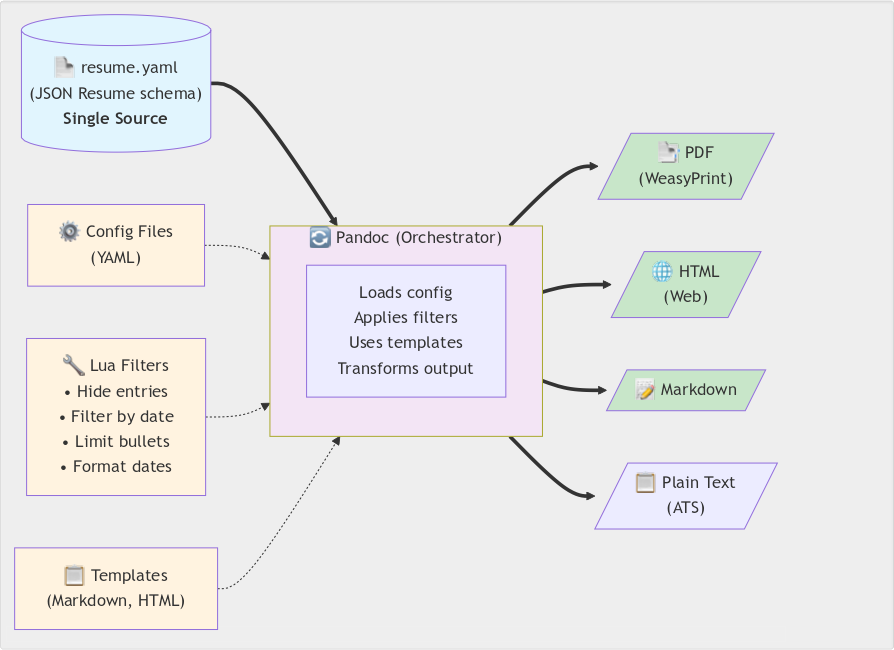
    Instead of man­ag­ing vari­ants man­u­al­ly, I treat my résumé as data flow­ing through a con­fig­urable trans­for­ma­tion pipeline. One YAML file adher­ing to the JSON Resume schema serves as the source of truth. Pandoc with cus­tom Lua fil­ters trans­forms it based on YAML con­fig files.

    The fil­ters hide entries marked x-hidden: true, fil­ter by date ranges, lim­it bul­let points, and for­mat dates con­sis­tent­ly. They also adjust sec­tion titles auto­mat­i­cal­ly. The sys­tem out­puts PDF (via WeasyPrint), HTML, Markdown, or plain text. Git branch­es track ver­sions per company/​role.

    The archi­tec­ture sep­a­rates con­tent (YAML), pre­sen­ta­tion (tem­plates), and trans­for­ma­tion log­ic (Lua fil­ters). Configuration over dupli­ca­tion. Infrastructure as code.

    A single-source document generation system that transforms one YAML résumé file (following JSON Resume schema) into multiple output formats through Pandoc orchestration. The pipeline leverages configurable Lua filters for content customization (hiding entries, date filtering, bullet limiting), YAML configuration files for settings, and flexible templates to generate PDF (via WeasyPrint), HTML, Markdown, and ATS-compliant plain text versions. This approach ensures consistency across all formats while allowing format-specific optimizations and customizations.
    The résumé ren­der­ing pipeline

    Example: Platform engineering résumé

    Here’s how that think­ing plays out in prac­tice. For a plat­form engi­neer­ing role, I want to:

    1. Hide CPAN projects old­er than 10 years (too Perl-focused)
    2. Limit work high­lights to 3 per job (keep it concise)
    3. Emphasize con­tainer­iza­tion and automa­tion experience

    Example commands

    # Adjust configuration
    vim share/pandoc/metadata/date_past.yaml        # Set project age limit
    vim share/pandoc/metadata/highlights_limit.yaml # Set bullet limits
    
    # Generate
    ./scripts/save_pdf.sh eg/mjgardner_resume.yaml
    
    # Or with Docker
    docker compose run --rm resume-remixer \
      ./scripts/save_pdf.sh eg/mjgardner_resume.yaml

    The pipeline automatically:

    • Filters out old projects
    • Trims bul­let points to the first 3 per job
    • Updates sec­tion titles (“Projects” → Selected Recent Projects”)
    • Generates clean, pro­fes­sion­al PDF output

    No man­u­al edit­ing. No copy-​paste. Reproducible every time.

    Infrastructure thinking in practice

    Platform engi­neer­ing isn’t just spe­cif­ic tools — it’s an approach. When you see a repet­i­tive man­u­al process, you auto­mate. When data needs mul­ti­ple rep­re­sen­ta­tions, you build trans­for­ma­tion pipelines. When repro­ducibil­i­ty mat­ters, you containerize.

    This résumé gen­er­a­tor uses the same prin­ci­ples I apply to release pipelines and build automa­tion. One source of truth, con­fig­urable trans­for­ma­tions, repro­ducible out­put. The tools here are Pandoc, Lua, and Docker, but the approach works regard­less of stack.

    Using JSON Resume schema makes the data portable. Dockerizing the pipeline ensures repro­ducibil­i­ty across plat­forms. Version con­trol enables branch­ing per appli­ca­tion. The right abstrac­tions (YAML con­fig files instead of code) make it usable.

    The code

    Full source, doc­u­men­ta­tion, and exam­ples: codeberg.org/mjgardner/resume-remixer

    Licensed open source. If you’re main­tain­ing mul­ti­ple résumé ver­sions man­u­al­ly, give it a try. Let me know how you adapt it for your own workflow.

  • Porting from Perl to Go: Simplifying for Platform Engineering

    Porting from Perl to Go: Simplifying for Platform Engineering

    Rewriting a script for the Homebrew pack­age man­ag­er taught me how the Go pro­gram­ming lan­guage’s design choic­es align with platform-​ready tools.

    The problem with brew upgrade

    By default, the brew upgrade com­mand updates every for­mu­la (ter­mi­nal util­i­ty or library). It also updates every cask (GUI appli­ca­tion) it man­ages. All are upgrad­ed to the lat­est ver­sion — major, minor, and patch. That’s con­ve­nient when you want the newest fea­tures, but dis­rup­tive when you only want qui­et patch-​level fixes.

    Last week I solved this in Perl with brew-patch-upgrade.pl, a script that parsed brew upgrades JSON out­put, com­pared seman­tic ver­sions, and upgrad­ed only when the patch num­ber changed. It worked, but it also remind­ed me how much Perl leans on implic­it struc­tures and run­time flexibility.

    This week I port­ed the script to Go, the lin­gua fran­ca of DevOps. The goal was­n’t fea­ture par­i­ty — it was to see how Go’s design choic­es map onto plat­form engi­neer­ing concerns.

    Why port to Go?

    • Portfolio prac­tice: I’m build­ing a body of work that demon­strates plat­form engi­neer­ing skills.
    • Operational focus: Go is wide­ly used for tool­ing in infra­struc­ture and cloud environments.
    • Learning by con­trast: Rewriting a work­ing Perl script in Go forces me to con­front dif­fer­ences in error han­dling, type safe­ty, and distribution.

    The journey

    Error handling philosophy

    Perl gave me try/​catch (exper­i­men­tal in the Perl v5.34.1 that ships with macOS, but since accept­ed into the lan­guage in v5.40). Go, famous­ly, does not. Instead, every func­tion returns an error explicitly.

    Perl:

    use v5.34;
    use warnings;
    use experimental qw(try);
    use Carp;
    use autodie;
    
    ...
    
    try {
      system 'brew', 'upgrade', $name;
      $result = 'upgraded';
    }
    catch ($e) {
      $result = 'failed';
      carp $e;
    }

    Go:

    package main
    
    import (
      "os/exec"
      "log"
    )
    
    ...
    
    cmd := exec.Command("brew", "upgrade", name)
    if output, err := cmd.CombinedOutput(); err != nil {
      log.Printf("failed to upgrade %s: %v\n%s",
        name,
        err,
        output)
    }

    The Go ver­sion is nois­i­er, but it forces explic­it deci­sions. That’s a fea­ture in pro­duc­tion tool­ing: no silent failures.

    Dependency management

    • Perl: cpanfile + CPAN mod­ules. Distribution means install Perl (if it’s not already), install mod­ules, run script.” Tools like carton and the cpan or cpanm com­mands help auto­mate this. Additionally, one can use fur­ther tool­ing like fatpack and pp to build more self-​contained pack­ages. But those are nei­ther com­mon nor (except for cpan) dis­trib­uted with Perl.
    • Go: go.mod + go build. Distribution is a sin­gle (platform-​specific) binary.

    For oper­a­tional tools, that’s a mas­sive sim­pli­fi­ca­tion. No run­time inter­preter, no depen­den­cy dance.

    Type safety

    Perl let me parse JSON into hashrefs and trust the keys exist. Go required a struct:

    type Formula struct {
      Name              string   `json:"name"`
      CurrentVersion    string   `json:"current_version"`
      InstalledVersions []string `json:"installed_versions"`
    }

    The com­pil­er enforces assump­tions that Perl left implic­it. That fric­tion is valu­able — it sur­faces errors early.

    Binary distribution

    This is where Go shines. Instead of telling col­leagues install Perl v5.34 and CPAN mod­ules,” I can hand them a bina­ry. No need to wor­ry about script­ing run­time envi­ron­ments — just grab the right file for your system.

    Available on the release page. Download, run, done.

    Semantic versioning logic

    In Perl, I man­u­al­ly com­pared arrays of ver­sion num­bers. In Go, I import­ed golang.org/x/mod/semver:

    import (
      golang.org/x/mod/semver
    )
    
    ...
    
    if semver.MajorMinor(toSemver(formula.InstalledVersions[0])) !=
      semver.MajorMinor(toSemver(formula.CurrentVersion)) {
      log.Printf("%s is not a patch upgrade", formula.Name)
      results.skipped++
      continue
    }

    Cleaner, more leg­i­ble, and less error-​prone. The library encodes the con­ven­tion, so I don’t have to.

    Deliberate simplification

    I did­n’t port every fea­ture. Logging adapters, sig­nal han­dlers, and edge-​case diag­nos­tics remained in Perl. The Go ver­sion focus­es on the core log­ic: parse JSON, com­pare ver­sions, run upgrades. That restraint was inten­tion­al — I want­ed to learn Go’s idioms, not repli­cate every Perl flourish.

    Platform engineering insights

    Three lessons stood out:

    1. Binary dis­tri­b­u­tion mat­ters. Operational tools should be instal­lable with a sin­gle copy step. Go makes that trivial.
    2. Semantic ver­sion­ing is an oper­a­tional prac­tice. It’s not just a con­ven­tion for library authors — it’s a con­tract that tool­ing can enforce.
    3. Go’s design aligns with plat­form needs. Explicit errors, type safe­ty, and sta­t­ic bina­ries all reduce sur­pris­es in production.

    Bringing it home

    This isn’t a Perl vs. Go” sto­ry. It’s a sto­ry about delib­er­ate sim­pli­fi­ca­tion, tak­ing a work­ing Perl script and recast­ing it in Go. The aim is to see how the lan­guage’s choic­es shape a solu­tion to the same problem.

    The result is homebrew-semver-guard v0.1.0, a small but stur­dy tool. It’s not feature-​finished, but it’s production-​ready in the ways that matter.

    Next up: I’m con­sid­er­ing more Go tools, maybe even Kubernetes for ser­vices on my home serv­er. This port was prac­tice, an arti­fact demon­strat­ing plat­form engi­neer­ing in action.


    Links